Quick answer: In this ASUS ASCENT GX10 review, Greg Bryant, CTO of One Media Connect, said, “We found it to be an excellent fit for local general-purpose AI chat, on-device image and short-video generation, and any workflow where privacy, stability, or zero ongoing cloud cost matters more than raw speed. It is not a drop-in replacement for cloud-hosted agentic coding tools like Claude Code or Codex if speed is your top priority — though it still gets the job done fully offline”.
One Media Connect offers a dynamic multi-agent workflow to bring enterprise-level analytics to Main Street businesses, so business owners who barely have time to sleep can get the actionable insights needed to reduce spend without reducing effectiveness.
Below, we break down a hands-on field test from OMC’s CTO, Greg Bryant, who pushed the GX10 across three real workloads, so you can decide if it fits your use case before you buy.
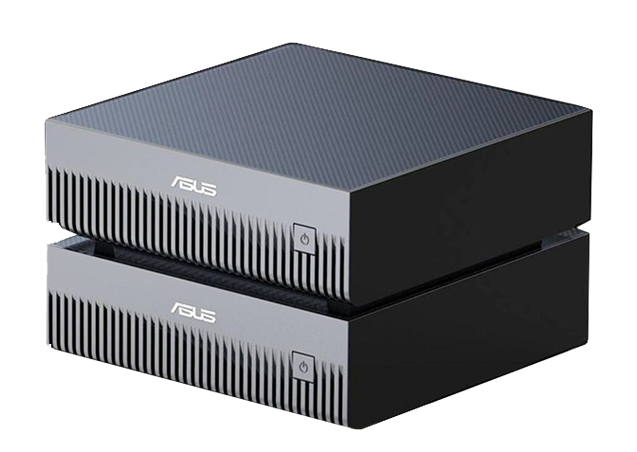
The ASUS ASCENT GX10 is a desktop “mini supercomputer” built around the NVIDIA GB10 Grace Blackwell Superchip — the same architecture family behind NVIDIA DGX Spark. In a standalone box small enough to sit next to a workstation, it packs:
That combination puts it at roughly one-third the price of an RTX 6000 card, while running as its own self-contained system. For teams exploring local AI infrastructure, that price-to-capability ratio is one of the GX10’s biggest draws — but specs only tell part of the story. What matters is how it performs on real workloads, day after day. That’s exactly what this ASUS ASCENT GX10 review sets out to answer.
We asked an AI-focused customer who deployed a GX10 both personally and for his company, One Media Connect, to put it through three concrete goals: general AI chat, game asset generation, and agentic coding. Here’s what he found.
Verdict: Well-suited.
The simplest goal was also the smoothest. Using the GX10’s built-in setup “playbooks,” our reviewer launched a Dockerized Open WebUI + Ollama stack — a self-hosted, browser-based chat interface that mirrors ChatGPT or Claude’s desktop app, but runs entirely on local AI chat hardware.
He loaded GPT-OSS:120B, an open-source 120-billion-parameter model that typically needs around 80GB of memory — well beyond any consumer GPU, but comfortably within the GX10’s 128GB of unified memory. The built-in playbooks made initial setup notably easy, even for workflows he hadn’t tested before.
By default, Ollama consumes essentially all available memory, which locked out remote desktop logins until Docker memory limits were adjusted. It’s a one-time fix, but worth knowing if you’re planning a shared or remote-access deployment.
Bottom line: If your goal is running a private, large open-source chat model — for research, internal tooling, or removing reliance on cloud AI subscriptions — the GX10 handles it cleanly and stays stable under sustained load.
Verdict: Well-suited, with a learning curve around environment setup.
For creative and game-asset workflows, our reviewer used ComfyUI, a node-based visual tool for AI image, video, and audio generation. He’d previously run smaller models on a consumer RTX 5090; the GX10’s memory headroom let him move up significantly — a key theme throughout this ASUS ASCENT GX10 review.
Initial attempts to containerize ComfyUI in Docker ran into Python library version conflicts — a common issue with fast-moving open-source AI tooling, not unique to the GX10. Installing ComfyUI in a Python virtual environment instead resolved it.
Bottom line: For studios, indie developers, or marketing teams generating iterative visual assets, the GX10’s memory capacity unlocks model sizes that aren’t practical on consumer GPUs — without sending proprietary art direction or unreleased game assets to a third-party cloud service.
Verdict: It works, but set accurate expectations.
This is where the GX10’s limitations showed up most clearly — and it’s the most important section of this ASUS ASCENT GX10 review for technical buyers to read carefully.
The reviewer’s normal workflow uses cloud-hosted agentic coding harnesses — Claude Code, Codex, or Kiro — paired with frontier models. He tried to replicate that locally using the ASUS ASCENT GX10 for agentic coding.
opencode-ai paired with the qwen3.6 model stayed on task and produced genuinely usable output. The catch: speed. A feature that would normally take 30–45 minutes with a cloud-hosted tool took roughly six hours locally.
As the reviewer put it: “You really can’t expect a single GPU (even if it is multi-core) to match a cloud service that is using 10s if not hundreds of GPUs to handle your requests.” That’s a fair expectation to set for any single-unit local AI hardware, including the GX10.
Bottom line: The GX10 is a viable agentic coding sandbox for fully air-gapped or offline development, low-stakes batch tasks, or experimentation with model/harness combinations — but if your team optimizes for development velocity above all else, cloud-hosted coding agents will still outperform a single local unit. The reviewer’s next step is testing two linked GX10 units over ConnectX-7 to see how much that closes the gap.
Based on this hands-on ASUS ASCENT GX10 review, it’s a strong fit if you need:
It’s a less ideal fit, at least as a single unit, if your top priority is:
For many organizations, the right answer isn’t “GX10 instead of the cloud” — it’s “GX10 alongside the cloud,” handling local, private, or batch workloads while cloud tools handle the time-critical ones. That’s exactly the hybrid model the reviewer is exploring for his own company’s commercial AI use.
Hardware specs only tell you what’s possible — getting a GX10 properly configured, networked, and stable for your specific workload (chat, creative generation, coding, or a mix) takes real setup expertise, as this ASUS ASCENT GX10 review shows.
ClearCube Technology is a U.S.-based manufacturer with a 100% in-house, U.S.-based technical support team. The GX10 is part of our broader AI Computing Hardware lineup, alongside the HyperCube AI 4125GS for multi-GPU enterprise deployments and the ASUS NUC 14 Pro AI for personal Copilot-class AI at the edge. We help customers match the right AI hardware to the right workload, instead of guessing and hoping it scales.
Curious whether a GX10 — or a linked pair of them — fits your team’s AI workload? Schedule a 15-minute call with our experts — they’re real people, not a bot.
Q: What is the ASUS ASCENT GX10 used for?
A: The GX10 is a standalone desktop AI computer built on NVIDIA’s GB10 Grace Blackwell Superchip. It’s designed for local AI chat, on-device image and video generation, and offline agentic coding — workloads where privacy, stability, or eliminating cloud costs matter more than raw speed.
Q: Is the ASUS ASCENT GX10 worth buying?
A: Based on hands-on testing, it’s well worth it if you need a private, stable alternative to cloud AI tools for chat, creative generation, or offline development. It’s a less ideal fit if your top priority is maximum agentic coding speed, where cloud-hosted tools still outperform a single local unit.
Q: How much memory does the ASUS ASCENT GX10 have?
A: The GX10 includes 128GB of unified memory, enough to run large open-source models like a 120-billion-parameter chat model that typically requires around 80GB — well beyond what consumer GPUs can handle.
Q: Can the ASUS ASCENT GX10 run AI coding agents like Claude Code or Codex?
A: Yes, but with tradeoffs. In testing, the GX10 successfully ran agentic coding workflows using opencode-ai paired with the qwen3.6 model, but tasks that take 30–45 minutes with cloud-hosted tools took roughly six hours locally.
Q: How does the GX10 compare in price to an RTX 6000?
A: Comparing the GX10 vs RTX 6000, the GX10 costs roughly one-third the price while functioning as a complete standalone system rather than a card requiring a separate host machine.
Q: Can two GX10 units be linked together?
A: Yes. The GX10 includes NVIDIA ConnectX-7 networking, which allows two units to be linked to handle larger models or workloads that exceed a single unit’s capacity.
Q: Is the ASUS ASCENT GX10 good for AI image and video generation?
A: Yes. In testing, the GX10 ran high-memory models like HiDream O1 for image generation and Wan2.2 for text-to-video, producing usable ~5-second video clips in about 25 minutes — well-suited for iterative game asset and creative workflows.